Your AI Chord Progression Muse

Chordelia is a smart, interactive tool for musicians, producers, and songwriters who want fresh, inspiring chord progressions in seconds. Just choose your key, genre, mood, and complexityโ€”and let Chordelia's AI craft unique progressions for you.

AI-Powered Smart Generation
Real-time MIDI Integration
Unlimited Creative Freedom

๐Ÿ’ก No installation needed! Try Chordelia instantly in your browser
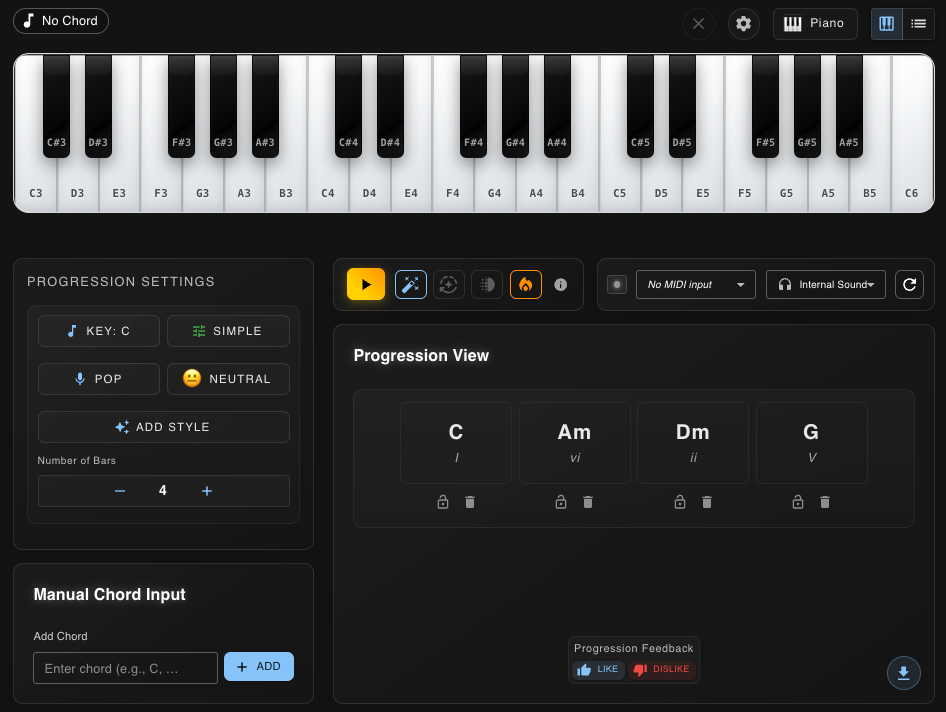
Chordelia App Interface - AI Chord Progression Generator with Virtual Piano and Progression Settings
๐ŸŽน Live Demo

Create & Evolve Your Music

Powerful tools to generate, edit, and perfect your chord progressions

๐Ÿค–

AI-Generated Progressions

Create original chord progressions from scratch using key, genre, mood, and complexity parameters. Add custom style prompts for unique sounds.

๐ŸŽผ

Manual Chord Input

Start with your own chords and let AI enhance them, or use them as a foundation for new progressions.

โœ๏ธ

Smart Progression Editing

Lock specific chords you love, regenerate others, and "spice up" progressions with chord extensions and alterations.

๐ŸŽน

Interactive Instrument Views

Visualize chords on interactive piano and guitar fretboard views. See key positions and chord names in real-time.

๐ŸŽ›๏ธ

Professional MIDI Integration

Connect external MIDI instruments, display real-time notes, and send MIDI output to your DAW with built-in sound engine.

โš™๏ธ

Advanced Audio Controls

Adjust tempo, velocity, volume, modulation, and other parameters. Export your progressions as MIDI files for professional use.

Download Chordelia

Get the app for your platform and start creating amazing chord progressions today

๐ŸŒ

Try Chordelia Web App

No download required! Access Chordelia instantly in your browser with full functionality

๐Ÿš€ Launch Web App
Or download for your platform

Windows

Compatible with Windows 10 and 11

v0.1.5 45.2 MB
โฌ‡๏ธ Download for Windows

System Requirements

  • Windows 10 (64-bit) or later
  • 4GB RAM minimum
  • 500MB free disk space
  • DirectX 11 compatible graphics

Ubuntu (Debian)

Linux support for Ubuntu 20.04 and Debian 11

v0.1.5 38.7 MB
โฌ‡๏ธ Download for Ubuntu

System Requirements

  • Ubuntu 20.04 LTS or Debian 11
  • 4GB RAM minimum
  • 500MB free disk space
  • OpenGL 3.3 compatible graphics

Choose Your Plan

Start free and upgrade as you grow

Free

$0/month
  • 5 progressions per day
  • Basic genres
  • Standard quality audio
  • Community support
Get Started Free

About Chordelia

Chordelia is the result of years of collaboration between musicians and engineers who share a passion for music and innovation. It reflects a deep understanding of composition and how AI can inspire new ideas.

Whether you're a beginner songwriter or a professional producer, Chordelia helps you break through creative blocks and discover new musical possibilities.

Join us at the start of something exciting. Chordelia is launching now, and we're committed to continuously improving the experience based on feedback from musicians like you.

Frequently Asked Questions

Everything you need to know about Chordelia

What is Chordelia?

Chordelia is an AI-powered chord progression generator designed for musicians, producers, and songwriters. It helps you create unique, professional chord progressions instantly by using advanced AI algorithms combined with music theory.

Is Chordelia free to use?

Yes! Chordelia offers a free plan that allows you to generate up to 5 chord progressions per day with basic features. For unlimited access and advanced features like MIDI export and all genres, you can upgrade to our Pro plan for just $4.99/month.

What platforms does Chordelia support?

Chordelia is available for Windows (10 and 11), macOS (Monterey and newer, both Apple Silicon and Intel), and Linux (Ubuntu 20.04, Debian 11). You can download the appropriate version for your operating system from our downloads page.

Can I export my chord progressions to my DAW?

Absolutely! Chordelia supports full MIDI integration, allowing you to export your chord progressions as MIDI files that can be imported directly into any digital audio workstation (DAW) like Ableton, Logic Pro, FL Studio, or Pro Tools.

Do I need music theory knowledge to use Chordelia?

Not at all! Chordelia is designed to be intuitive for beginners while still powerful for professionals. The AI handles the music theory for you, but if you want to customize and refine progressions manually, that option is available too.

Can I connect my MIDI keyboard to Chordelia?

Yes! Chordelia supports external MIDI instruments. You can connect your MIDI keyboard to input chords manually, preview progressions, and send MIDI output to external devices or software instruments.